GOING FORWARD PHOTONIQUE WILL BE ADVERTISMENT FREE
GOING FORWARD PHOTONIQUE WILL BE ADVERTISMENT FREE
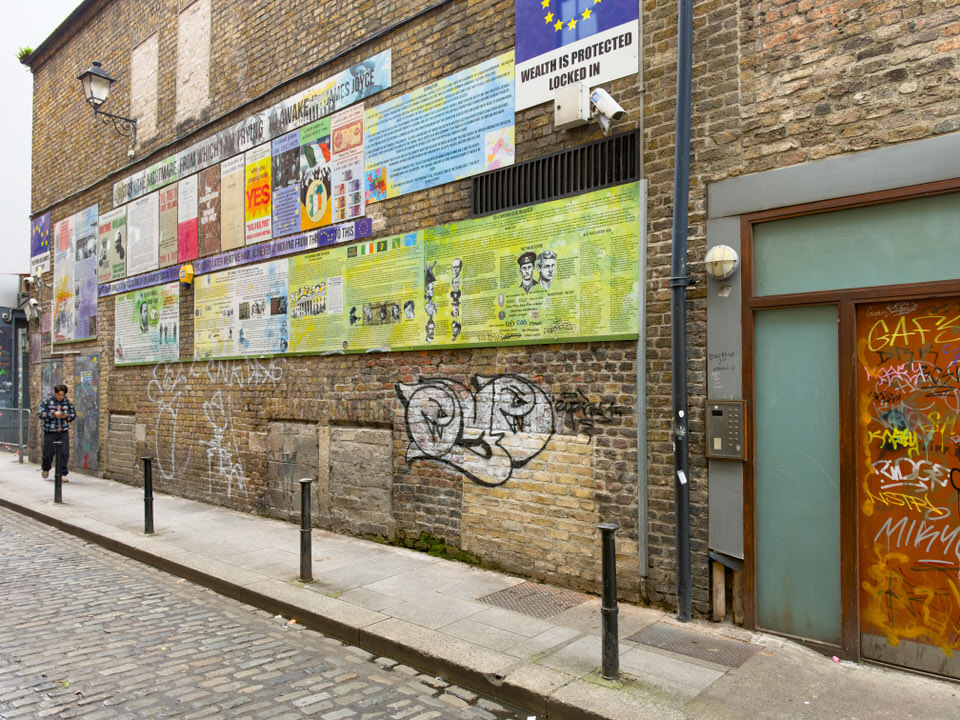
Originally Photographed 19 September 2026
Temple Bar Captured Using The iPhone 18 Pro
There is a satisfying numerical symmetry in having the iPhone 18 land on your doorstep on the 18th of September.
Apple officially opened general availability and customer deliveries for the iPhone 18 Pro lineup on Friday, 18 September 2026, making it one of those rare calendar alignments where model generation and launch date match up. For anyone with an appreciation for small coincidences, getting day-one delivery with matching digits feels oddly deliberate on Apple’s part—even if it’s just the product of their traditional mid-September Friday release schedule.
Taking it out the very next day to put the new cameras through their paces against Temple Bar’s textures—cobblestones, wet brick, and dim cellar entrances—is about as fitting a maiden voyage as it gets.
Many first-time visitors to Dublin mistake Temple Bar for nothing more than a single, postcard-famous red-brick public house. In reality, it is one of the city's oldest surviving medieval and early modern quarters. Bounded by the River Liffey to the north and Dame Street to the south, the district takes its name from Sir William Temple—Provost of Trinity College—who built his house and gardens here in the early 17th century on reclaimed land along the riverbank ("bar" referring to a raised estuarine sandbank used for walking).
By the mid-20th century, long before neon signs and stag parties arrived, Temple Bar served as the gritty, practical engine room of Dublin's wholesale trade.
During the 1960s, the cobbled laneways bustled with garment manufacturers, rag merchants, paper suppliers, produce wholesalers, and specialist electronics importers such as ITG (International Trading Company), which supplied high-end hi-fi systems across Ireland.
Popular accounts often romanticise this era with atmospheric descriptions of vast, open cellars and atmospheric underground vaults. The physical reality beneath the flagstones was far more challenging. Because the entire quarter was built directly over the sloblands—unstable river silt and marshy mud reclaimed from the tidal Liffey—early builders had to rely on rudimentary vernacular engineering. Foundations were routinely laid over floating rafts of brushwood fascines, compacted organic matter, and animal detritus (often recalled in local trade lore as resting on "pig bladders") in a desperate bid to stabilise structures and create damp-proof barriers over the shifting mud.
While commercial premises did indeed feature interconnected subterranean passages—engineered so merchants could roll barrels, crates, and electronic stock between properties without choking the narrow streets above—they were brutally utilitarian. Most of these historic cellars have long been permanently inaccessible, heavily waterlogged, or completely flooded by high water tables and tidal river seepage. The transit passages themselves were walled up and blocked off decades ago during corporate acquisitions, fire safety enforcement, and the structural underpinning of the 1990s regeneration.
Today, that subterranean world remains firmly locked away under solid concrete and kerbstones.
Throughout the late 1960s and 1970s, Córas Iompair Éireann (CIÉ), the state transport authority, began quietly purchasing swathes of property across the area. Their objective was sweeping: demolish the historic streetscapes to make way for a sprawling central bus depot, complete with underground platforms and shopping arcades.
While awaiting planning consent and state funding, CIÉ let the acquired warehouses on short-term, nominal leases. This administrative delay unintentionally gave birth to modern Dublin's creative heart:
Artists and Independents: Neglected shopfronts and rock-bottom rents quickly drew record shops, darkrooms, rehearsal spaces, vintage clothing stalls, and recording studios.
Civic Resistance: Grassroots campaigns led by architects, residents, and cultural figures mounted fierce opposition, highlighting the district's irreplaceable medieval street footprint.
The turning point came in 1991. Recognizing the organic bohemian community that had taken root, the Irish Government scrapped the transport hub scheme entirely and established Temple Bar Properties to regenerate the enclave as Dublin's designated cultural quarter.
A local dealer sold me a 17 Pro Case as being suitable but I had issues.
I now know that iPhone 17 Pro cases do not fit the iPhone 18 Pro properly, and the port obstruction I experienced is the classic telltale sign.
While the two phones look very similar at a glance, several minor dimensional and structural shifts prevent cross-generation case compatibility:
Shifting Port Alignment: Apple adjusted the internal board layout and bottom chassis margins on the 18 Pro. Even a shift of 0.5 mm to 1 mm in port centering or lip depth causes rigid 17 Pro case cutouts to collide with standard USB-C cable connector housings.
Case Wall Interference: The base of the iPhone 18 Pro sits slightly differently inside the 17 Pro shell. The cable tip might enter the port slightly, but the molded plastic or aluminum collar of the cable hits the edge of the case cutout before making a secure physical and electrical latch.
Other Fit Issues to Check
Beyond the charging port, using a 17 Pro case on an 18 Pro usually causes additional subtle problems:
Camera Plateau Cutout: Even fractional changes to the camera island or sensor ring diameters cause the case's raised protective lip to ride up against the camera glass rather than sitting flush around it. Button Offsets & Camera Control: The Action Button and Camera Control / Capture interface positions are precision-aligned. A legacy case frequently causes button stiffness, partial presses, or touch-capacitance dead zones.
Workarounds and Next Steps
Test with a Slim-Collar Cable: If you need to charge it right now, try an ultra-slim, unshielded USB-C cable (such as Apple's thin braided in-box cable rather than a chunky third-party fast-charging cable) to see if it clears the cutout opening.
Use MagSafe / Qi2 Temporarily: If physical plugging remains unreliable, rely on a MagSafe puck or Qi2 wireless pad to avoid stretching the port or damaging the cable connector. Return the Case: Bring the case back to the dealer. Accessory manufacturers tool separate, dedicated moulds for the 18 Pro series specifically because chassis tolerances and bottom mic/speaker/port alignments do not carry over cleanly.
As I needed to use the phone immediately and I also needed a wrist strap, which created some other issues, I decided to get an Energizer / Eveready snap-on magnetic pack and it appears to work.
A few practical tips to keep in mind when using it with the iPhone 18 Pro:
Camera Plateau Clearance: The triple-lens module on the 18 Pro extends slightly lower down the chassis than on standard models. Make sure the top edge of the pack sits cleanly below the camera plateau lip rather than resting on the bezel edge, ensuring full, flat magnetic surface contact.
Use a Proper MagSafe Case: If you attach the pack over a third-party protective case, ensure the case has built-in rear magnetic alignment rings. Snapping directly through plain plastic weakens the magnetic bond, increasing the risk of the pack twisting loose when sliding into a coat pocket.
Dual-Duty Charging: Most of these units support pass-through charging. Plugging a USB-C cable directly into the power bank at night charges both the battery pack and the phone simultaneously via induction, reviving the single-cable convenience of the old XR setup.
Overall, user sentiment for the Energizer magnetic snap-on power banks sits around a solid 4.2 to 4.5 out of 5 stars across major electronics retailers. Most buyers consider them dependable, no-nonsense daily workhorses that cost noticeably less than premium offerings from Anker or Apple while delivering practical day-out utility.
What People Praise
Excellent Value for Money: They typically undercut high-end accessory brands by 25% to 40% while delivering comparable cell capacities (commonly 5,000mAh or 10,000mAh).
Dependable Top-Up Capacity: The 5,000mAh version reliably delivers roughly 70% to 85% of a full recharge to modern Pro iPhones—ideal for extending a day of heavy photography or navigation without toting a bulky brick.
Portability & Hand Feel: The slim metal and rounded-edge designs slip easily into a jacket pocket or palm without snagging.
Clear Readouts & Wired Flexibility: Many of their units feature a digital LED battery percentage readout rather than vague blinking dots, and the bi-directional 20W USB-C port lets you quickly plug in with a short cord if you ever need a rapid wired burst.
Common Criticisms & Trade-Offs
Magnetic Grip Strength: This is the most frequent note in customer reviews. While the magnet holds firmly against a naked iPhone or a case with strong integrated MagSafe rings, it shears or twists off fairly easily if used over standard, unmagnetized cases or when shoved into tight jeans pockets. Note: This is the only issue that I have noticed.
Thermal Throttling: Like almost all compact magnetic chargers, both the phone and the battery get moderately warm during wireless induction. In response, the phone’s battery management system will occasionally throttle charging speeds to protect the internal battery cells, causing the last 15%–20% of the charge cycle to slow down noticeably.
Manual Power Activation: Some models require pressing a small side button to start wireless charging once snapped on, rather than auto-negotiating immediately like Apple’s first-party pack. Users occasionally report thinking the phone was charging when it was simply resting attached.
For street excursions or travel, as long as it is paired with a dedicated MagSafe-ringed case, general consensus rates it as a practical, wallet-friendly alternative to the old integrated battery sleds.
Using the iPhone predominantly for continuous GPS location tagging—whether running background geotagging for a digital camera or mapping urban routes—places a very specific, sustained drain on battery life. GPS receivers and constant cellular network handshakes keep the phone’s baseband and application processors awake, which drains power steadily rather than in quick spikes.
Keeping one or two compact magnetic packs in your camera bag is an ideal strategy, provided you manage the thermal and connection nuances of active GPS logging:
Key Field Tips for GPS & Magnetic Banks
Avoid In-Pocket Wireless Charging During GPS Logging
Continuous high-accuracy GPS tracking generates steady baseline heat. Wireless magnetic induction adds substantial ambient heat of its own.
When confined together inside an unventilated jacket or bag pocket, this heat can build quickly, causing iOS to halt charging at 80% to protect the battery.
Best practice: Snap the pack on while walking with the phone out in the air, or top up during a quick sit-down break rather than buried deep inside an insulated coat pocket.
The 10 cm Short USB-C Cable Fallback
Since the Energizer pack has a bi-directional USB-C port, tuck a durable 10 cm (4-inch) right-angled USB-C cable into an inner pouch of your camera bag.
If you are in heavy rain, moving through crowded streets where a magnetic pack might get knocked loose, or notice the phone warming up, a direct short cable runs cooler, charges twice as fast, and eliminates any risk of the battery twisting off its magnets.
If you are using a companion app (such as Sony Creators' App or Leica FOTOS) to broadcast Bluetooth LE location data to your camera:
Set Location Permissions to "Always" and ensure Background App Refresh is toggled On so it doesn't drop the handshake when the phone is locked.
Disable unnecessary background features within the phone (such as personal hotspot or screen-on navigation) to let the GPS run quietly in low-power states.
Carrying two slim packs means you can leave one on charge in your accommodation or bag while actively rotating the other, ensuring your coordinates never cut out halfway through an afternoon shoot.
Continuous background geotagging drains an iPhone quickly because keeping the high-precision GNSS radio running prevents the CPU from dropping into its deep sleep state.
To keep the phone running all day while preserving accurate coordinate metadata on your shots, apply these targeted system and app-level configurations:
Set Location Access to "Always" with "Precise Location" On: In Settings > Privacy & Security > Location Services > [Your Camera App], set access to Always. If set to "While Using," iOS will repeatedly suspend and re-wake the app every time the phone locks, which causes power-hungry re-negotiation cycles with the camera.
Turn Off Background App Refresh for Other Apps: Go to Settings > General > Background App Refresh. Keep the master switch On, leave your camera app enabled, but toggle Off social media, cloud sync, and news feeds. This prevents background apps from waking up and hijacking the cellular modem while the phone is idling.
EXAMPLES OF STREET ART ON DOMINICK STREET